Van een gekaapte HR-mailbox naar command-line access: phishing en C2 in RastaLabs
Ik had een foothold in de Outlook van de HR-medewerker. Nu moest ik dat omzetten in daadwerkelijke toegang tot een machine. Een verhaal over een macro-document dat niemand opende, een linktest om het gedrag van de slachtoffers te meten, en de Cobalt Strike-link die uiteindelijk twee beacons opleverde.
⚠ Lab & autorisatie. Dit speelt zich volledig af in RastaLabs, een commerciële red-team-oefenomgeving van Hack The Box die je per abonnement legaal mag aanvallen. Alle “medewerkers”, mailboxen en machines hieronder zijn gesimuleerd en van mij om op te oefenen. Dezelfde technieken — iemand een kwaadaardig bestand of een link mailen om toegang te krijgen tot hun computer — zijn in het echt strafbaar zonder uitdrukkelijke, schriftelijke opdracht. Ik schrijf dit bewust ook met de verdediging erbij: de blue-team-sectie onderaan hoort er net zo goed bij als de aanval.
◆ TL;DR. Ik had al inloggegevens voor de Outlook Web App van Amber Hope, een HR-medewerker. Vanuit die vertrouwde mailbox probeer ik een foothold op een werkstation te krijgen. Eerst een Word-document met een kwaadaardige macro — dat werd op mijn eigen testmachine meteen door de antivirus gepakt, na obfuscatie werkte het wél, maar vervolgens opende niemand het. Daarna een kleine linktest om te meten of de slachtoffers überhaupt op links klikken (dat deden ze). En tot slot een Cobalt Strike scripted web delivery verpakt in een HTA-link: twee mensen klikten, en ik had mijn eerste command-line toegang op het interne netwerk.
Dit is deel twee van mijn RastaLabs-reis. In het eerste deel heb ik via enumeratie en een gerichte password-bruteforce toegang gekregen tot de Outlook Web App (OWA) van één medewerker: RLAB\ahope — Amber Hope. Dat is een mooi begin, maar een mailbox is geen shell. Mijn doel nu: die toegang omzetten in code execution op een Windows-machine binnen het domein, zodat ik écht voet aan de grond heb in het netwerk en verder kan bewegen.
Ik bouw dit stap voor stap op, en leg onderweg elke term uit. Aan het eind is het geen trucje, maar een logisch verhaal.
00 · Waar we staan: een voet tussen de deur bij HR
Even het vertrekpunt scherp: ik heb geldige credentials voor de webmail van Amber Hope, en zij werkt op de HR-afdeling. Dat laatste is belangrijker dan het klinkt. HR is de afdeling die iedereen in het bedrijf verwacht te horen — over contracten, vergaderingen, documenten die je “even moet lezen”. Een mail van HR wekt veel minder argwaan dan een mail van een onbekende.
Het eerste wat ik doe is die mailbox volledig uitpluizen: inbox, verzonden items, concepten, en zelfs verwijderde mail proberen te herstellen. Veel leverde dat niet op — geen wachtwoorden, geen sappige interne documenten. Maar één ding wél: via de adreslijst (Global Address List) van Outlook kon ik alle medewerkers zien, inclusief hun functie en afdeling.
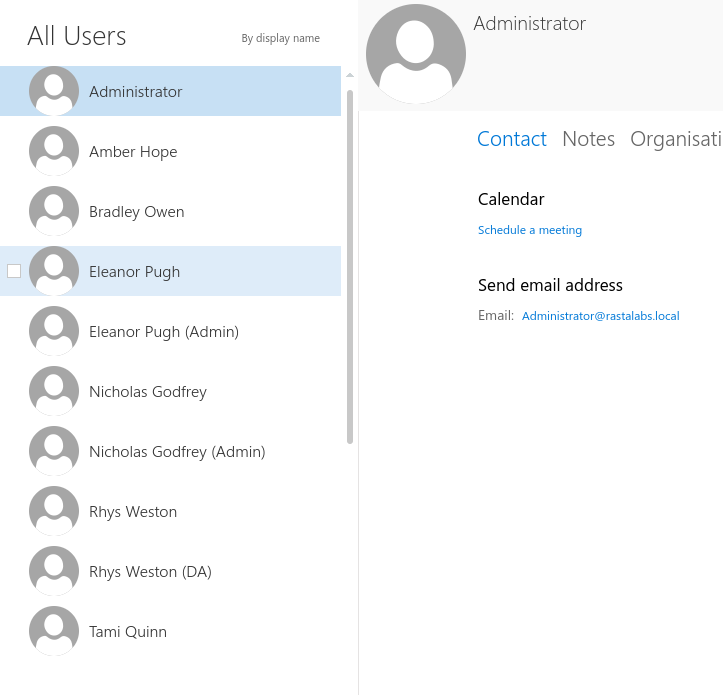
De Global Address List verraadt niet alleen namen en e-mailadressen, maar ook wie waar werkt. Je ziet zelfs aparte “(Admin)” en “(DA)” accounts naast de gewone accounts — gescheiden beheer-accounts, interessant voor later.
Dit is goud voor een phishing-scenario. Ik weet nu precies naar wie ik kan mailen, en ik mail vanuit een account dat zij vertrouwen. De vraag is alleen nog: wat stuur ik, zodat een klik mij toegang geeft?
01 · Het plan: wat betekent “een foothold” eigenlijk?
Wat ik wil, heet een foothold: één uitgevoerd stukje code op een machine van een slachtoffer, dat terugverbindt naar mij en me commando’s laat uitvoeren. In het jargon heet dat remote code execution (RCE) — ik draai code op een computer die niet de mijne is.
Het risico: alles wat ik stuur, moet langs de verdediging van het slachtoffer. Een modern Windows-systeem heeft antivirus en vaak een host-IDS (intrusion detection system — software die verdacht gedrag op de machine zelf opmerkt). Als mijn payload (de kwaadaardige lading) herkend wordt, is niet alleen de aanval mislukt, maar weet de verdediger ook dat er iemand aan het klooien is. Stealth is dus net zo belangrijk als dat het werkt.
Ik woog een paar opties af om die RCE te krijgen:
- msfvenom — de payload-generator van Metasploit. Snel, maar de standaard-payloads zijn zó bekend dat elke antivirus ze blind herkent.
- Eigen scripts (Python/C#) omgebouwd tot een los uitvoerbaar bestand dat een reverse shell teruggeeft. Flexibeler, maar nog steeds makkelijk te betrappen.
- PDF-JS — JavaScript in een PDF embedden. Leuk, maar ook een bekend en verdacht patroon.
- Een C2-framework.
Ik koos voor dat laatste, en daar wil ik even bij stilstaan.
Wat is een C2-framework?
C2 staat voor Command and Control. Een C2-framework is gereedschap waarmee een aanvaller een gecompromitteerde machine op afstand bestuurt. Op de machine van het slachtoffer draait een klein programmaatje — afhankelijk van het framework heet dat een agent, een beacon of een grunt — dat op gezette tijden “naar huis belt” naar mijn server en vraagt: heb je taken voor mij? Ik stuur dan commando’s terug, en het resultaat komt bij mij binnen.
Waarom is dat beter dan een los payload-bestand? Twee redenen:
- Het blendt in. Een C2 praat over gewone protocollen zoals HTTP/HTTPS, net als een browser. Het verkeer ziet er daardoor uit als normaal webverkeer in plaats van als “een reverse shell op poort 4444”.
- Het is blijvend en flexibel. In plaats van één vast kunstje kan ik doorlopend nieuwe commando’s sturen, bestanden uploaden, en meerdere machines tegelijk beheren — essentieel als ik straks door het netwerk wil pivoten (van de ene machine naar de andere springen).
Ik begon met Covenant, een open-source C2-framework. Later stapte ik over op Cobalt Strike, een bekend commercieel red-team-platform. De techniek die ik laat zien, werkt bij allebei hetzelfde.
02 · Attempt 1: een kwaadaardig Word-document
Mijn eerste idee is klassiek: een Word-document met een macro. Even de begrippen:
- Een macro is een stukje automatiserings-code (geschreven in VBA, Visual Basic for Applications) dat je in een Office-bestand kunt stoppen. Bedoeld voor onschuldige dingen zoals “maak automatisch een tabel op”. Maar een macro kan ook gewoon systeemcommando’s uitvoeren.
- De truc is een speciale macro genaamd
AutoOpen(). Zoals de naam zegt: Word draait die automatisch zodra het document geopend wordt. Geen klik op een knop nodig — openen is genoeg.
Conceptueel ziet mijn macro er zo uit (vereenvoudigd, zonder de daadwerkelijke payload):
Sub AutoOpen()        ' draait automatisch bij openen
    mymacro
End Sub

Sub mymacro()
    Set wsh = CreateObject("WScript.Shell")
    wsh.Run "<mijn C2-launcher>"   ' start het agentje stil op de achtergrond
End Sub
WScript.Shell is een ingebouwd Windows-object waarmee je programma’s en commando’s kunt starten. Mijn macro gebruikt het om mijn C2-launcher (de PowerShell-regel die het agentje binnenhaalt) stilletjes te draaien zodra het document opent. Ik sla het op als .docm — de Word-indeling die macro’s mag bevatten (een gewone .docx kan dat niet).
Eerst testen op mijn eigen machine — en meteen betrapt
Regel nummer één voordat je iets naar een slachtoffer stuurt: test het eerst op je eigen machine. Dat deed ik, en dit was het resultaat:

Word (en de antivirus eronder) pakt het direct: “het uitvoeren van macro’s is geblokkeerd omdat de bron van dit bestand niet wordt vertrouwd.” Volkomen logisch — mijn macro bevat letterlijk woorden als powershell en -EncodedCommand, en daar zijn detecties op geschreven.
Dit is precies waarom een naïeve payload niet werkt: de verdediging herkent de verdachte trefwoorden. De oplossing in de aanvallerswereld heet obfuscation (verhulling): je herschrijft de code zó dat hij functioneel hetzelfde doet, maar niet meer op die bekende patronen matcht. Ik gebruikte een bestaande open-source VBA-obfuscator die mijn macro omzet naar een onleesbare, maar werkende variant:
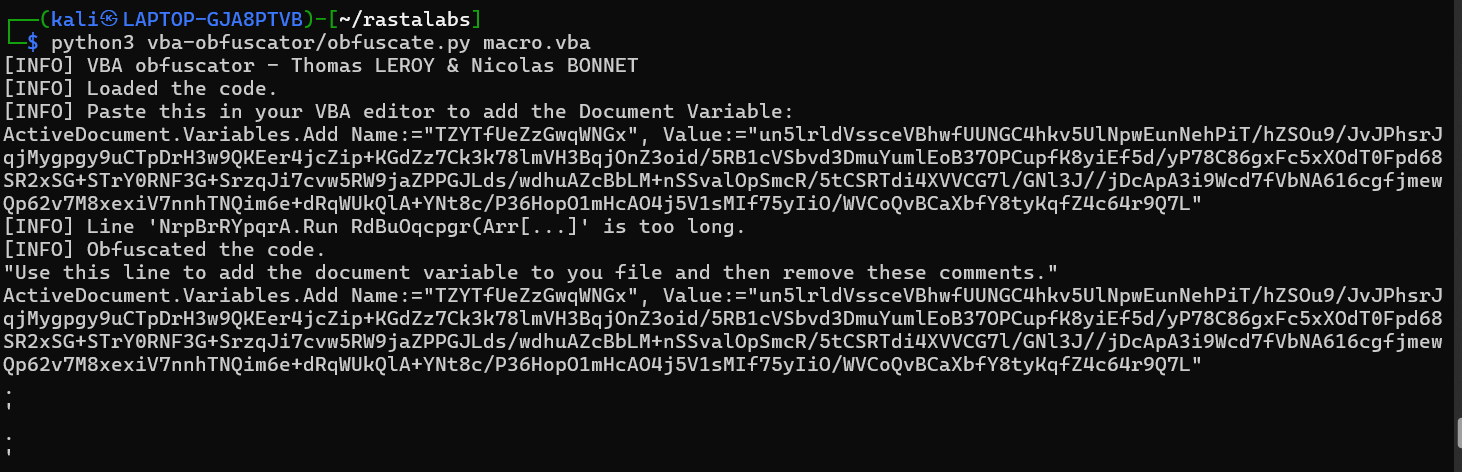
De obfuscator verstopt de payload in een “document variable” en haalt de verdachte trefwoorden weg, zodat de signatuur-detectie er niet meer op aanslaat.
Na obfuscatie testte ik het opnieuw op mijn eigen Windows-machine — en nu kwam het agentje netjes binnen. In Covenant zie je dan een nieuwe grunt verschijnen:

Een actieve grunt: hostname LAPTOP-GJA8PTVB — dat is mijn eigen testmachine, precies zoals bedoeld. De verbinding staat, ik kan commando’s sturen.
Even checken of ik ook echt commando’s kan draaien op de gecompromitteerde machine — en ja, het werkt. Covenant heeft zelfs een ingebouwde keylogger (software die toetsaanslagen opneemt):
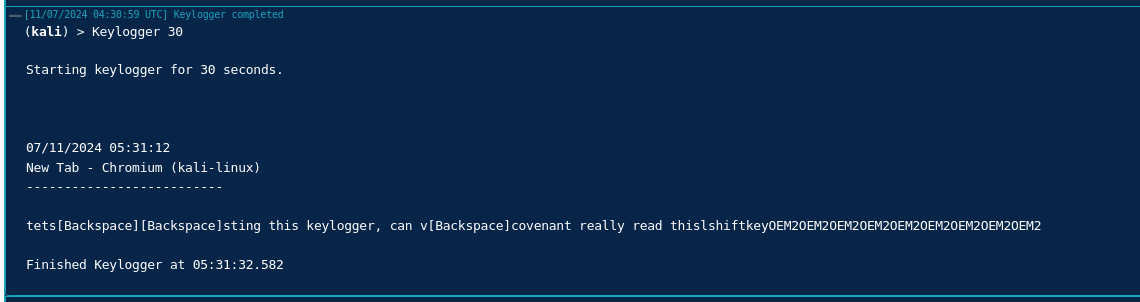
De keylogger vangt netjes op wat er getypt wordt. Op mijn eigen testmachine, welteverstaan — dit bewijst alleen dat de controle volledig is.
En toen… klikte niemand
Het werkt lokaal, dus tijd om het echt te sturen. Ik stelde vanuit Ambers HR-mailbox een mail op aan de medewerkers, met het .docm-bestand eraan, en een geloofwaardig HR-verhaaltje eromheen:
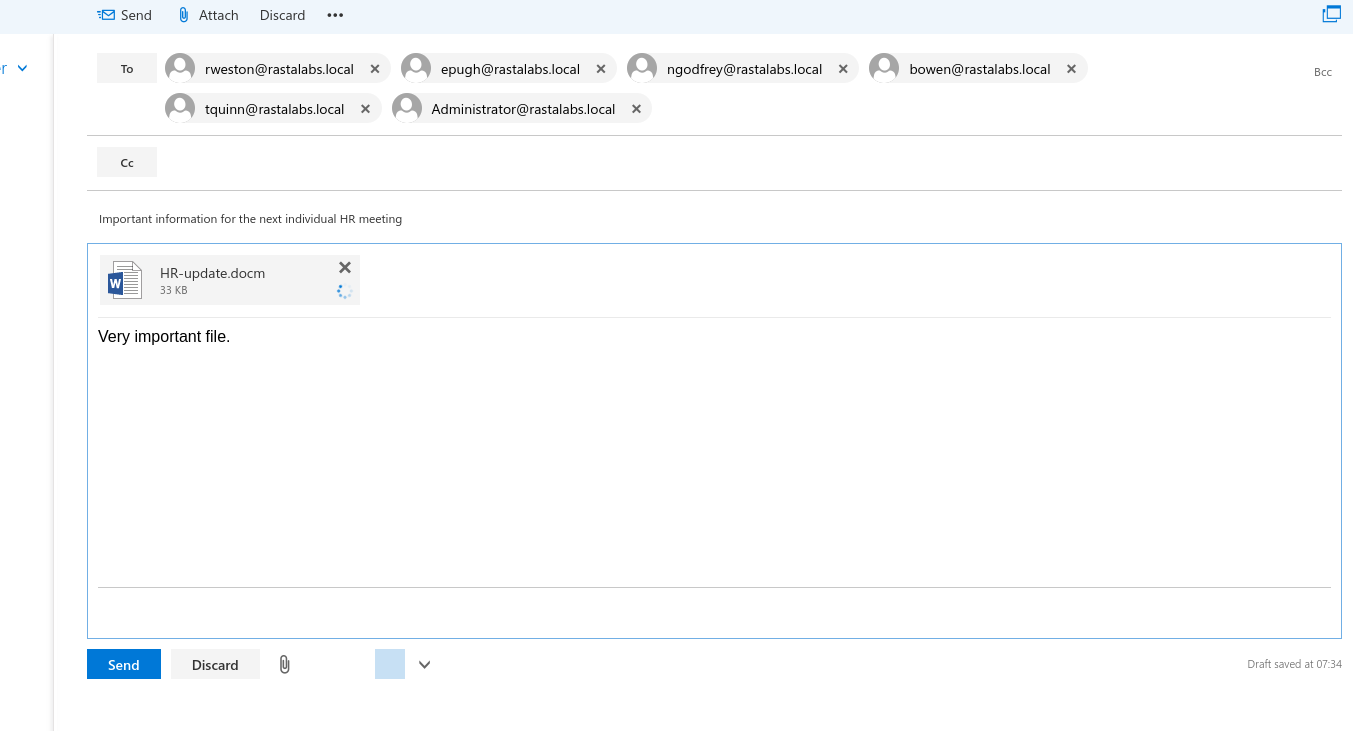
Verzonden vanuit de vertrouwde HR-mailbox, naar de medewerkers, met onderwerp “Important information for the next individual HR meeting” en het bestand HR-update.docm eraan. Overtuigend genoeg, zou je denken.
En toen werd het stil. Ik wachtte, en wachtte, en… niemand opende het document. Geen enkele grunt. Dat is een belangrijke les op zich: een aanval kan technisch perfect zijn en toch volledig falen op de menselijke factor. Misschien waren de medewerkers getraind om geen bijlagen te openen, misschien vertrouwden ze het .docm-formaat niet. Hoe dan ook: terug naar de tekentafel.
03 · Attempt 2: klikken ze überhaupt op iets?
Voordat ik een hoop werk steek in een nieuwe payload, wil ik eerst iets simpelers weten: klikken deze mensen eigenlijk wel ergens op? Een bijlage openen is een grotere drempel dan op een link klikken — dus misschien ligt het aan het bestand, niet aan de bereidheid.
Ik test dat met het simpelst denkbare middel: een webservertje dat elke bezoeker logt. Ik mail een onschuldig ogende link en kijk of er iemand op klikt.
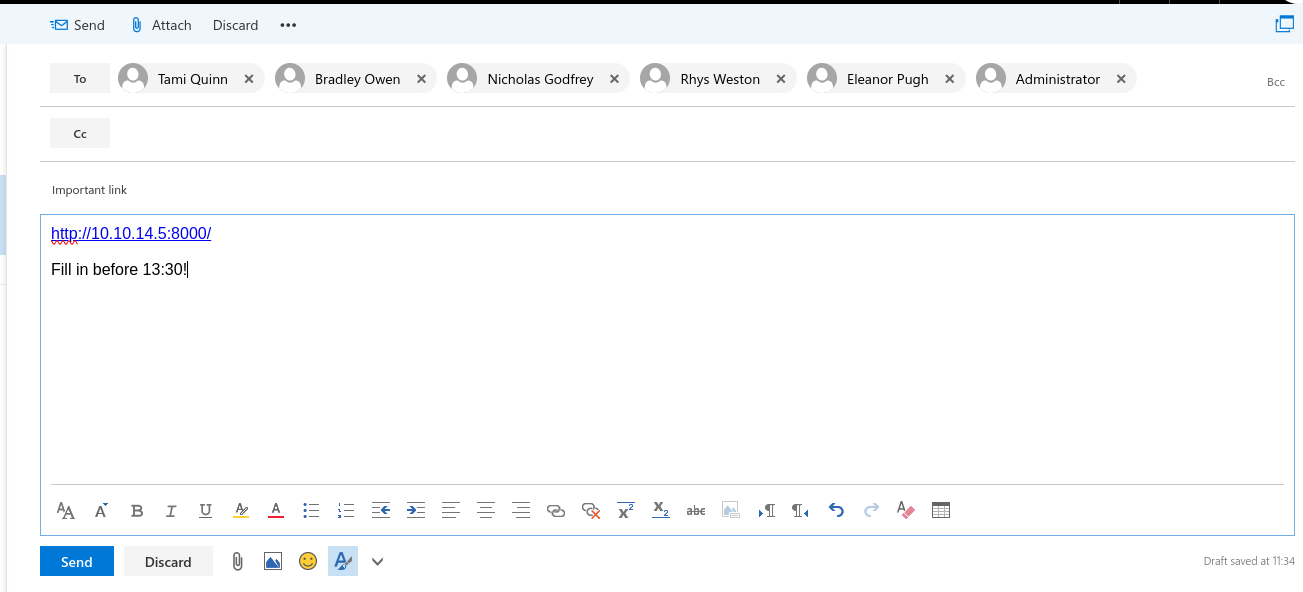
Een kale link naar mijn eigen webserver (http://10.10.14.5:8000/), met een beetje tijdsdruk erbij (“Fill in before 13:30!”). Puur om te meten: klikt er iemand?
En ja hoor — in de logs van mijn webserver verscheen een bezoeker. De medewerkers klikken dus wél op links, ze zijn alleen huiverig voor bijlagen. Dat is precies de informatie die ik nodig had. Mijn hele aanpak schuift nu van “bestand” naar “link”.
04 · Attempt 3: Cobalt Strike via een HTA-link
Nu ik weet dat links werken, bouw ik een link die bij het openen meteen mijn code uitvoert. Hiervoor stap ik over naar Cobalt Strike en gebruik ik twee van zijn bouwstenen.
Stap 1 — een listener. Een listener is simpelweg het oor van mijn C2: het onderdeel dat op mijn server luistert naar binnenkomende beacons. Ik zet een HTTP-beacon-listener op.
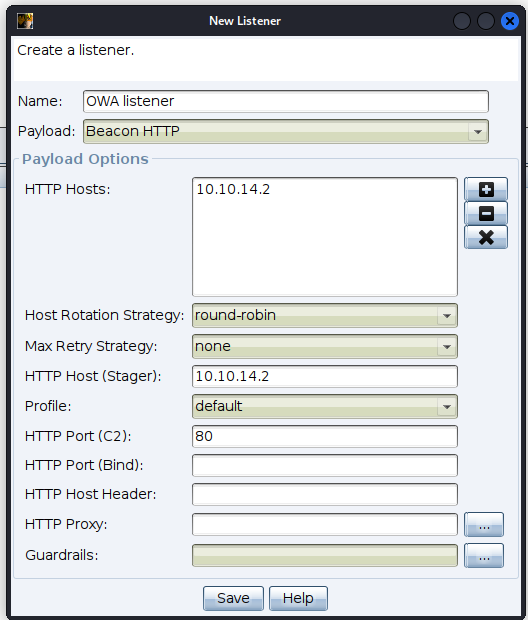
Een “Beacon HTTP” listener. Het beacon op het slachtoffer zal straks over gewone HTTP terugpraten naar deze host — onopvallend tussen het normale webverkeer.
Stap 2 — scripted web delivery. Dit is een functie van Cobalt Strike die kwaadaardige code op een webserver host. Download je die code en voer je hem uit, dan krijg ik een beacon terug. Ik koos als type PowerShell IEX. Even uitpakken:
- PowerShell is de scripttaal die standaard op elke Windows staat — een vertrouwde Microsoft-tool, dus minder verdacht dan een onbekend
.exe. - IEX is de afkorting van
Invoke-Expression: een PowerShell-commando dat tekst ophaalt en direct als code uitvoert. Het haalt mijn beacon-script dus live op en draait het, zonder dat er een bestand op schijf hoeft te staan.
Stap 3 — verpakken in een HTA. Een HTA (HTML Application) is een ouder Windows-bestandstype: het ziet eruit als een webpagina, maar Windows voert het uit met volledige rechten, inclusief het mogen starten van programma’s. Ik host mijn launcher als een HTA-bestand op mijn webserver. De link die ik mail, wijst naar dat bestand: wie hem opent, downloadt en draait de HTA, die op zijn beurt mijn PowerShell-launcher uitvoert — en dan verbindt het beacon terug.
Met die link stuurde ik opnieuw een mail vanuit de HR-mailbox:
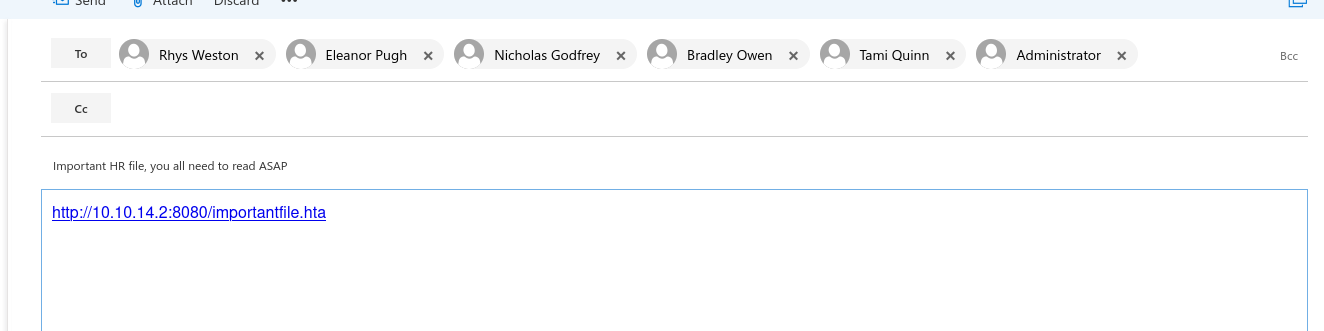
“Important HR file, you all need to read ASAP” met een link naar importantfile.hta. Ditmaal geen bijlage om te openen — alleen een link om op te klikken, precies wat uit de linktest bleek te werken.
En deze keer… hebben we beet. Twee mensen klikten:
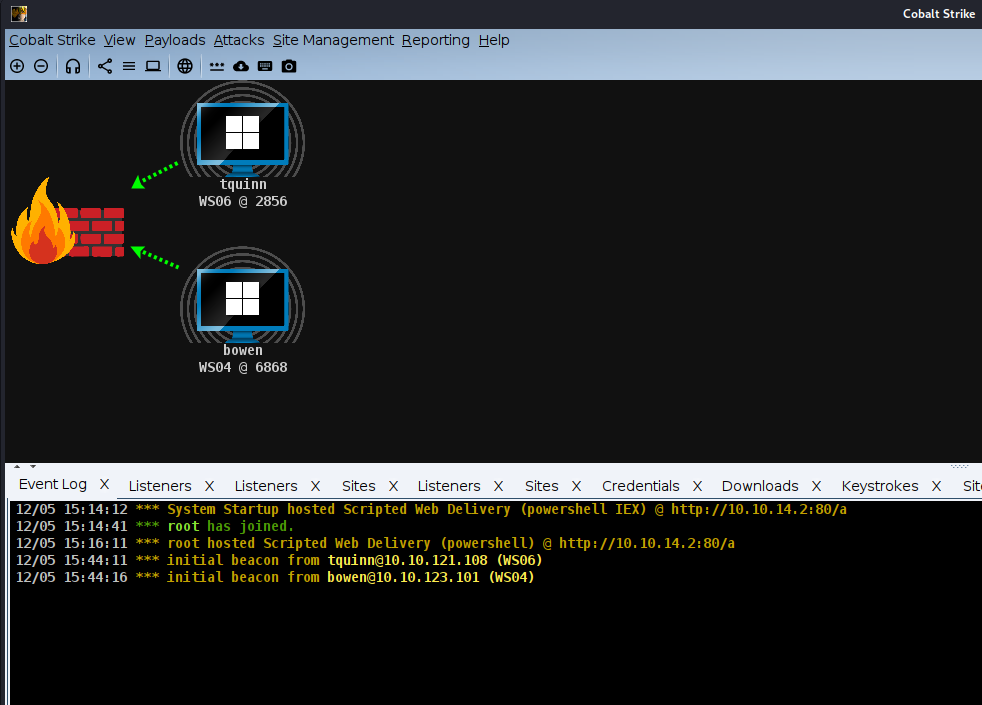
Het doel bereikt: twee verse beacons in de Cobalt Strike-grafiek — bowen op WS04 en tquinn op WS06. In de event-log zie je netjes “initial beacon from …” verschijnen. De vlammetjes zijn de firewall tussen hun machines en mij; het verkeer komt er dwars doorheen over de toegestane HTTP-poort.
Dat is het moment waar ik naartoe werkte: ik heb nu command-line toegang op twee werkstations binnen het domein. Vanaf hier kan ik commando’s uitvoeren alsof ik aan die machine zit.
05 · Een comfortabelere shell (een kleine firewall-hobbel)
Het beacon van Cobalt Strike werkt prima, maar voor sommig werk wil ik een directere reverse shell (een kale terminal-verbinding terug naar mijn machine, die ik met netcat opvang). Mijn eerste poging over de klassieke poort 4444 leverde niets op — stilte.
De oorzaak: de firewall van RastaLabs liet uitgaand verkeer op zo’n ongebruikelijke poort niet door. De oplossing is simpel maar leerzaam: kies een poort die vrijwel altijd open staat voor uitgaand verkeer, zoals 443 (de standaardpoort voor HTTPS). Over 443 kwam de shell wél netjes terug. Les: je verkeer vermommen als “normaal” gaat niet alleen over het protocol, maar ook over de poort die je kiest.
06 · Blue team: hoe vang je dit?
Zoals altijd de belangrijkste sectie — want een aanval begrijpen is pas nuttig als je ‘m ook kunt stoppen. Elke stap hierboven heeft een tegenmaatregel:
- Macro’s standaard blokkeren. Office kan macro’s uit bestanden van internet volledig uitschakelen (Microsoft doet dit inmiddels standaard). Mijn hele attempt 1 strandt hierop als het goed is ingesteld. Overweeg macro-uitvoering alleen toe te staan voor digitaal ondertekende, vertrouwde documenten.
- Phishing-awareness bij medewerkers. Het meest pakkende detail van dit verhaal is dat de mensen mijn eerste aanval stopten door simpelweg de bijlage niet te openen. Training werkt. Leer mensen ook link-domeinen te controleren en vreemde
.hta-downloads te wantrouwen. - Blokkeer of beperk gevaarlijke bestandstypen.
.hta-bestanden hebben zelden een legitiem doel in een moderne omgeving. Blokkeer de uitvoering ervan (bijvoorbeeld via een AppLocker-/WDAC-beleid) en filter ze uit mail. - Egress filtering (uitgaand verkeer beperken). Mijn reverse shell faalde op poort 4444 en slaagde op 443 — puur omdat de firewall willekeurig uitgaand verkeer op 443 wél toeliet. Een strak egress-beleid dat alleen verkeer naar bekende bestemmingen toestaat, maakt het terugbellen van een C2 veel moeilijker.
- Monitor PowerShell en verdachte ouder-kindprocessen. Een Word- of
mshta.exe-proces dat plotseling PowerShell start metIEX/-EncodedCommand, is een klassiek aanvalspatroon. Zet PowerShell script block logging aan en alarmeer op dit soort procesketens (bijvoorbeeld met Sysmon + een SIEM). - Detecteer C2-baken-gedrag. Een machine die met vaste, regelmatige tussenpozen kleine HTTP-verzoekjes naar dezelfde externe host stuurt (“beaconing”), is een verdacht patroon dat netwerk-detectietools kunnen oppikken, zelfs als het verkeer versleuteld is.
- Minste privileges + accountscheiding. De aparte “(Admin)”- en “(DA)“-accounts in de adreslijst zijn goed denken: beheerrechten horen niet in het dagelijkse account dat ook mail leest. Hoe minder een gecompromitteerd werkstation-account mag, hoe minder een foothold waard is.
07 · Samengevat, en wat nu?
De grote les van dit deel is dat een succesvolle inbraak zelden één perfecte exploit is, maar een ketting van stappen waarin je je aanpast aan wat je leert. Mijn technisch meest verfijnde aanval — het geobfusceerde macro-document — faalde volledig, niet op de techniek maar op de mens. Een kale linktest, nauwelijks “hacken” te noemen, leverde de cruciale informatie: deze mensen klikken wél op links. Daarop paste ik mijn hele aanpak aan, en de simpele HTA-link deed wat de geavanceerde macro niet kon.
Ik sta nu met command-line toegang op twee werkstations (WS04 en WS06) in het RastaLabs-domein. Maar dit zijn gewone gebruikersaccounts — ik wil hoger. In het volgende deel laad ik SharpHound/BloodHound om de Active Directory-omgeving in kaart te brengen: welke accounts, groepen en vooral welke paden er zijn naar een account met meer rechten. Dat eerste beacon is geen eindpunt — het is de startlijn.
Referenties: MITRE ATT&CK — T1566.001 (Phishing: Spearphishing Attachment), T1566.002 (Spearphishing Link), T1059.001 (PowerShell), T1218.005 (Mshta), T1071.001 (Application Layer Protocol: Web). Hack The Box — RastaLabs. Covenant (open-source C2). OWASP — Phishing-bewustzijn en e-mailbeveiliging.
⚠ Lab & authorization. This takes place entirely inside RastaLabs, a commercial red-team training environment from Hack The Box that you may legally attack with a subscription. All the “employees”, mailboxes and machines below are simulated and mine to practise on. The same techniques — mailing someone a malicious file or link to gain access to their computer — are a crime in the real world without explicit, written authorization. I deliberately write this with the defence included: the blue-team section at the end belongs here just as much as the attack.
◆ TL;DR. I already had credentials for the Outlook Web App of Amber Hope, an HR employee. From that trusted mailbox I try to get a foothold on a workstation. First a Word document with a malicious macro — my own antivirus caught it instantly on my test machine; after obfuscation it worked, but then nobody opened it. Next a small link test to measure whether the victims click links at all (they do). And finally a Cobalt Strike scripted web delivery wrapped in an HTA link: two people clicked, and I had my first command-line access on the internal network.
This is part two of my RastaLabs journey. In the first part, through enumeration and a targeted password brute-force, I gained access to the Outlook Web App (OWA) of one employee: RLAB\ahope — Amber Hope. A nice start, but a mailbox is not a shell. My goal now: turn that access into code execution on a Windows machine inside the domain, so I actually have a foothold in the network and can move further.
I’ll build this up step by step and explain every term along the way. By the end it reads as a logical story, not a trick.
00 · Where we stand: a foot in the door at HR
Let’s pin down the starting point: I have valid credentials for the webmail of Amber Hope, and she works in the HR department. That last detail matters more than it sounds. HR is the department everyone in the company expects to hear from — about contracts, meetings, documents you “just need to read”. A mail from HR raises far less suspicion than one from a stranger.
The first thing I do is comb through that mailbox completely: inbox, sent items, drafts, and even trying to restore deleted mail. It didn’t yield much — no passwords, no juicy internal documents. But one thing it did: through Outlook’s address book (Global Address List) I could see every employee, including their job title and department.
The Global Address List gives away not only names and email addresses, but who works where. You can even spot separate “(Admin)” and “(DA)” accounts next to the regular ones — segregated admin accounts, interesting for later.
This is gold for a phishing scenario. I now know exactly who to mail, and I’m mailing from an account they trust. The only question left: what do I send, so that one click gives me access?
01 · The plan: what does “a foothold” actually mean?
What I want is called a foothold: one piece of executed code on a victim’s machine that connects back to me and lets me run commands. In jargon that’s remote code execution (RCE) — I run code on a computer that isn’t mine.
The risk: everything I send has to get past the victim’s defences. A modern Windows system has antivirus and often a host IDS (intrusion detection system — software that notices suspicious behaviour on the machine itself). If my payload (the malicious cargo) gets recognised, not only has the attack failed, but the defender now knows someone is poking around. Stealth matters just as much as it working.
I weighed a few options to get that RCE:
- msfvenom — Metasploit’s payload generator. Fast, but its default payloads are so well-known that every antivirus recognises them blindly.
- Custom scripts (Python/C#) turned into a standalone executable that returns a reverse shell. More flexible, but still easy to catch.
- PDF-JS — embedding JavaScript in a PDF. Fun, but also a known and suspicious pattern.
- A C2 framework.
I went with the last one, and it’s worth pausing on.
What is a C2 framework?
C2 stands for Command and Control. A C2 framework is tooling that lets an attacker control a compromised machine remotely. On the victim’s machine runs a small program — depending on the framework it’s called an agent, a beacon or a grunt — that periodically “calls home” to my server and asks: do you have tasks for me? I then send commands back, and the results come in to me.
Why is that better than a standalone payload file? Two reasons:
- It blends in. A C2 talks over ordinary protocols like HTTP/HTTPS, just like a browser. The traffic therefore looks like normal web traffic instead of “a reverse shell on port 4444”.
- It’s persistent and flexible. Instead of one fixed trick I can keep sending new commands, upload files, and manage several machines at once — essential when I later want to pivot through the network (hop from one machine to the next).
I started with Covenant, an open-source C2 framework. Later I switched to Cobalt Strike, a well-known commercial red-team platform. The technique I show works the same on both.
02 · Attempt 1: a malicious Word document
My first idea is a classic: a Word document with a macro. Quick definitions:
- A macro is a bit of automation code (written in VBA, Visual Basic for Applications) that you can embed in an Office file. Meant for innocent things like “auto-format a table”. But a macro can just as easily run system commands.
- The trick is a special macro called
AutoOpen(). As the name says: Word runs it automatically the moment the document is opened. No button to click — opening is enough.
Conceptually my macro looks like this (simplified, without the actual payload):
Sub AutoOpen()        ' runs automatically on open
    mymacro
End Sub

Sub mymacro()
    Set wsh = CreateObject("WScript.Shell")
    wsh.Run "<my C2 launcher>"    ' quietly starts the agent in the background
End Sub
WScript.Shell is a built-in Windows object for launching programs and commands. My macro uses it to quietly run my C2 launcher (the PowerShell line that pulls in the agent) the moment the document opens. I save it as .docm — the Word format that is allowed to contain macros (a plain .docx can’t).
Test on my own machine first — and caught immediately
Rule number one before you send anything to a victim: test it on your own machine first. I did, and this was the result:
Word (and the antivirus beneath it) catches it straight away: “macros have been blocked because the source of this file is not trusted” (in Dutch here). Perfectly logical — my macro literally contains words like powershell and -EncodedCommand, and detections are written for exactly those.
This is precisely why a naive payload fails: the defence recognises the suspicious keywords. The attacker-world answer is called obfuscation: you rewrite the code so it does functionally the same thing but no longer matches those known patterns. I used an existing open-source VBA obfuscator that converts my macro into an unreadable but working variant:
The obfuscator hides the payload inside a “document variable” and strips the suspicious keywords, so signature-based detection no longer triggers on it.
After obfuscation I tested again on my own Windows machine — and now the agent came in cleanly. In Covenant you then see a new grunt appear:
An active grunt: hostname LAPTOP-GJA8PTVB — that’s my own test machine, exactly as intended. The connection is up, I can send commands.
Just checking I can actually run commands on the compromised machine — and yes, it works. Covenant even has a built-in keylogger (software that records keystrokes):
The keylogger neatly captures what’s being typed. On my own test machine, mind you — this only proves the control is complete.
And then… nobody clicked
It works locally, so time to actually send it. From Amber’s HR mailbox I composed a mail to the employees, with the .docm file attached and a believable HR story around it:
Sent from the trusted HR mailbox, to the employees, with the subject “Important information for the next individual HR meeting” and the file HR-update.docm attached. Convincing enough, you’d think.
And then it went quiet. I waited, and waited, and… nobody opened the document. Not a single grunt. That’s an important lesson in itself: an attack can be technically perfect and still fail completely on the human factor. Maybe the employees were trained not to open attachments, maybe they didn’t trust the .docm format. Either way: back to the drawing board.
03 · Attempt 2: do they click anything at all?
Before I pour a lot of work into a new payload, I want to know something simpler first: do these people actually click on anything? Opening an attachment is a bigger hurdle than clicking a link — so maybe it’s the file, not the willingness.
I test that with the simplest possible means: a little web server that logs every visitor. I mail an innocent-looking link and see if anyone clicks.
A bare link to my own web server (http://10.10.14.5:8000/), with a little time pressure added (“Fill in before 13:30!”). Purely to measure: does anyone click?
And sure enough — a visitor showed up in my web server’s logs. So the employees do click links, they’re just wary of attachments. That’s exactly the information I needed. My whole approach now shifts from “file” to “link”.
04 · Attempt 3: Cobalt Strike via an HTA link
Now that I know links work, I build a link that executes my code the moment it’s opened. For this I switch to Cobalt Strike and use two of its building blocks.
Step 1 — a listener. A listener is simply the ear of my C2: the component on my server that listens for incoming beacons. I set up an HTTP beacon listener.
A “Beacon HTTP” listener. The beacon on the victim will later talk back to this host over ordinary HTTP — inconspicuous amid normal web traffic.
Step 2 — scripted web delivery. This is a Cobalt Strike feature that hosts malicious code on a web server. Download and run that code, and I get a beacon back. I chose the type PowerShell IEX. Let’s unpack that:
- PowerShell is the scripting language that ships on every Windows — a trusted Microsoft tool, so less suspicious than an unknown
.exe. - IEX is short for
Invoke-Expression: a PowerShell command that fetches text and runs it directly as code. So it pulls my beacon script live and runs it, without a file needing to touch the disk.
Step 3 — wrap it in an HTA. An HTA (HTML Application) is an older Windows file type: it looks like a web page, but Windows runs it with full privileges, including the right to launch programs. I host my launcher as an HTA file on my web server. The link I mail points to that file: whoever opens it downloads and runs the HTA, which in turn executes my PowerShell launcher — and then the beacon connects back.
With that link I again sent a mail from the HR mailbox:
“Important HR file, you all need to read ASAP” with a link to importantfile.hta. This time no attachment to open — just a link to click, exactly what the link test showed works.
And this time… we’re in. Two people clicked:
The goal reached: two fresh beacons in the Cobalt Strike graph — bowen on WS04 and tquinn on WS06. The event log neatly shows “initial beacon from …” appearing. The little flames are the firewall between their machines and me; the traffic passes straight through over the allowed HTTP port.
That’s the moment I was working toward: I now have command-line access on two workstations inside the domain. From here I can run commands as if I were sitting at that machine.
05 · A more comfortable shell (a small firewall bump)
Cobalt Strike’s beacon works fine, but for some work I want a more direct reverse shell (a bare terminal connection back to my machine, which I catch with netcat). My first attempt over the classic port 4444 returned nothing — silence.
The cause: RastaLabs’ firewall didn’t allow outbound traffic on such an unusual port. The fix is simple but instructive: pick a port that’s almost always open for outbound traffic, like 443 (the default port for HTTPS). Over 443 the shell did come back cleanly. Lesson: disguising your traffic as “normal” isn’t only about the protocol, but also the port you choose.
06 · Blue team: how do you catch this?
As always the most important section — because understanding an attack is only useful when you can also stop it. Every step above has a countermeasure:
- Block macros by default. Office can fully disable macros from files that came from the internet (Microsoft now does this by default). My entire attempt 1 dies here if it’s configured correctly. Consider allowing macro execution only for digitally signed, trusted documents.
- Phishing awareness among staff. The most striking detail of this story is that the people stopped my first attack by simply not opening the attachment. Training works. Also teach people to check link domains and to distrust odd
.htadownloads. - Block or restrict dangerous file types.
.htafiles rarely have a legitimate purpose in a modern environment. Block their execution (for example via an AppLocker/WDAC policy) and filter them out of mail. - Egress filtering (restrict outbound traffic). My reverse shell failed on port 4444 and succeeded on 443 — purely because the firewall happened to allow arbitrary outbound traffic on 443. A tight egress policy that only permits traffic to known destinations makes a C2 calling home much harder.
- Monitor PowerShell and suspicious parent-child processes. A Word or
mshta.exeprocess suddenly starting PowerShell withIEX/-EncodedCommandis a classic attack pattern. Turn on PowerShell script block logging and alert on these process chains (for example with Sysmon + a SIEM). - Detect C2 beaconing. A machine sending small HTTP requests to the same external host at fixed, regular intervals (“beaconing”) is a suspicious pattern that network-detection tools can pick up, even when the traffic is encrypted.
- Least privilege + account segregation. The separate “(Admin)” and “(DA)” accounts in the address list are good thinking: admin rights don’t belong in the everyday account that also reads mail. The less a compromised workstation account can do, the less a foothold is worth.
07 · In summary, and what’s next?
The big lesson of this part is that a successful breach is rarely one perfect exploit, but a chain of steps in which you adapt to what you learn. My technically most refined attack — the obfuscated macro document — failed completely, not on the technology but on the human. A bare link test, barely worth calling “hacking”, delivered the crucial information: these people do click links. I adapted my whole approach to that, and the simple HTA link did what the advanced macro couldn’t.
I now have command-line access on two workstations (WS04 and WS06) in the RastaLabs domain. But these are ordinary user accounts — I want higher. In the next part I load SharpHound/BloodHound to map the Active Directory environment: which accounts, groups, and above all which paths exist to an account with more rights. That first beacon isn’t an endpoint — it’s the starting line.
References: MITRE ATT&CK — T1566.001 (Phishing: Spearphishing Attachment), T1566.002 (Spearphishing Link), T1059.001 (PowerShell), T1218.005 (Mshta), T1071.001 (Application Layer Protocol: Web). Hack The Box — RastaLabs. Covenant (open-source C2). OWASP — Phishing awareness and email security.
Vragen of een fout gevonden? Mail said444b@gmail.com, correcties maken de volgende writeup beter.